Friday, 20 November 2015

5 Important Safety Tips For Internet Privacy

Do you know how easy it is to find certain information about you or your computer online?  Do your kids know?  It's easier than you might think.  Stuff that you post on social media, things that you look for on search engines, and even where you've been on the Internet (or where you are in the world) can be found over the Internet by governments, Internet companies, and some troublemaking individuals.
Usually, these practices are relatively harmless, but they're still a bit creepy (which is why there are some organizations trying to get them stopped, or at least curbed).  Fortunately, there are some simple things that you and your family can think about and do to limit the amount of sensitive information about yourselves that can be tracked online.  Here are 5 of our best general suggestions.

1. Use a custom private web browser instead of "private browsing"

Many popular Internet browsers have a "private browsing" mode, but it really isn't all that private.  This is because it only deletes Internet tracking records (such as your browsing history, cache, and cookies) from your computer when you close your browser.  Plus, it only works for that specific browser, and only for the time that you were in "private browsing" mode.  Basically, all that it does is prevent other people who use the same computer as you from seeing where you've been on the Internet.
However, your "digital footprints" are fair game for governments, website owners, data collection companies, and even some overly-nosy individuals while you're still actively browsing the Internet.  "Private browsing" mode won't do anything to help this.  What will help, though, is a custom private web browser that uses technical tricks to make your activity on the Internet difficult or impossible to track... and not just for people who use the same computer as you.  If you're used to using Google Chrome, try Epic Privacy Browser or Comodo Dragon.  If you're a Mozilla Firefox fan instead, try T.O.R. (The Onion Router) or Comodo IceDragon.

2. Search privately to avoid targeted results and advertisements

Some of the most common search engines -- the big three being Google Search, Yahoo Search, and Bing --  keep track of the different things that you search for when using them.  Not only do they use this information to show you advertisements related to what you have searched for (which is annoying and sort of creepy), but some of them may even alter your search results to be closer to things that you have looked for in the past. 
However, there are private search engines like DuckDuckGo, StartPage, and Disconnect Search that don't engage in this practice.  They only track your search results to improve their own accuracy, not to tailor advertisements or results to your supposed tastes.  This means that you can count on them for consistent results, even if you search for the exact same keywords multiple times.  Try them out!

3. Be aware that on the Internet, "free" still comes with a price

Many social networks and Internet-based tools (such as search engines) don't require you to pay money to sign up for them or use them.  That doesn't mean that they are without a price, though.  Using them often means that you are voluntarily allowing the Internet companies that run them services to collect and sell information that you generate from using these services.  
Now, this almost never includes sensitive personal or financial information, so don't worry about that. However, it does include your activities in public spaces on the website.  These could include clicking on certain hyperlinks, searching for certain keywords, posting a profile or status update, or even just logging onto the website from a particular computer.  All of this information can be tracked, collected, and used to sell advertisements on websites for products or services that have something to do with other places that you have been (or other things that you have done) on the Internet.
One way to get around this is to use web browsers and/or search engines that respect your privacy, as we outlined in tips 1 and 2.  Another practice that can help, if done occasionally, is deleting various pieces of information that keep track of your Internet activities, such as your browsing history or your tracking cookies.  Check out this article on how to clear your cache and browsing history, as well as this one on how to clear your cookies.

4. Know how websites collect and use your information (or don't)

Most websites these days have documents that outline what information the websites collect (or don't) from you when you use them, as well as how the websites use or share this information (or don't).  These are known as "privacy policies", and as important as they are, very few of them are easily understood by people who haven't been to law school.  Some people even mistakenly assume that a website is private simply because it has a privacy policy.
You can make reading a website's privacy policy easier by scanning for answers to a few specific questions.  What information does the website collect from you when you use it, and why?  Who does the website share the information that they collect from you with, when, and why?  How long does the website keep information that they collect from you?  These guidelines should give you a good idea of whether or not a website really does keep your activities private, and perhaps also whether or not you want to use that website at all.

5. Stay in control of your social media presence

Social networks present a special challenge when it comes to Internet privacy.  On the one hand, they encourage you to put yourself out there so that you can meet new people and discuss things that are important to you with friends past and present.  But this makes it easy to fall into the trap of voluntarily revealing more information about yourself than you would be comfortable with giving out in a different social setting.
The most important thing to remember about social media is this: don't post anything that you wouldn't be comfortable with anyone else (even one or more of your friends) sharing with a wider audience.  Yes, social networks often have private content controls and messaging channels (and you should still take advantage of these), but these conventions can only do so much to keep what you post from going public.  For the most part, you can't dictate what other people can or can't do on social media, so it only takes one person sharing something that you post for that content to slip out of your control and thus become almost impossible to erase or make private again.
There is plenty of other information on how to better understand and protect your privacy on the Internet at our website, Techboomers.com.  In addition to lessons on Internet safety and Internet privacy, we also have over 50 courses on how to safely and easily use some of the hottest websites on the Internet today, from social networks like Facebook and media player services like Netflix to knowledge databases like WebMD and general information tools like Google Maps.  Stop on by!

Top 10 Cyber Crime Prevention Tips

  1. Use Strong Passwords
    Use different user ID / password combinations for different accounts and avoid writing them down. Make the passwords more complicated by combining letters, numbers, special characters (minimum 10 characters in total) and change them on a regular basis.
  2. Secure your computer
    • Activate your firewall
      Firewalls are the first line of cyber defense; they block connections to unknown or bogus sites and will keep out some types of viruses and hackers.
    • Use anti-virus/malware software
      Prevent viruses from infecting your computer by installing and regularly updating anti-virus software.
    • Block spyware attacks
      Prevent spyware from infiltrating your computer by installing and updating anti-spyware software.
  3. Be Social-Media Savvy
    Make sure your social networking profiles (e.g. Facebook, Twitter, Youtube, MSN, etc.) are set to private. Check your security settings. Be careful what information you post online.  Once it is on the Internet, it is there forever!
  4. Secure your Mobile Devices
    Be aware that your mobile device is vulnerable to viruses and hackers.  Download applications from trusted sources.
  5. Install the latest operating system updates
    Keep your applications and operating system (e.g. Windows, Mac, Linux) current with the latest system updates. Turn on automatic updates to prevent potential attacks on older software.
  6. Protect your Data 
    Use encryption for your most sensitive files such as tax returns or financial records, make regular back-ups of all your important data, and store it in another location.
  7. Secure your wireless network
    Wi-Fi (wireless) networks at home are vulnerable to intrusion if they are not properly secured. Review and modify default settings. Public Wi-Fi, a.k.a. “Hot Spots”, are also vulnerable. Avoid conducting financial or corporate transactions on these networks.
  8. Protect your e-identity
    Be cautious when giving out personal information such as your name, address, phone number or financial information on the Internet. Make sure that websites are secure (e.g. when making online purchases) or that you’ve enabled privacy settings (e.g. when accessing/using social networking sites).
  9. Avoid being scammed
    Always think before you click on a link or file of unknown origin. Don’t feel pressured by any emails. Check the source of the message. When in doubt, verify the source. Never reply to emails that ask you to verify your information or confirm your user ID or password.  
  10. Call the right person for help
    Don’t panic! If you are a victim, if you encounter illegal Internet content (e.g. child exploitation) or if you suspect a computer crime, identity theft or a commercial scam, report this to your local police. If you need help with maintenance or software installation on your computer, consult with your service provider or a certified computer technician.
For more information on helping children protect themselves while on the Internet, visit:Cybertip.ca.
For more information on Cyber Security, visit: Get Cyber Safe
For more information about online fraud, scams or identity theft, visit:

Thursday, 19 November 2015

Increase Battery Life Of Laptop Easily

Every laptop or Netbook user these days have the same headache of limited backup time of batteries. As far as your system is new , you will have a good backup time but when it becomes a few months old you will definitely face problem of limited battery life.
So here I am giving you a solution to Increase battery life of laptop upto a sufficient extent.

STEPS TO INCREASE BATTERY LIFE OF  LAPTOP

Step 1: Click on the Start Menu and type “ CMD ” in the Start Search bar.
Step 2: The search will start and it will then display an icon of “ CMD ” . simply right click on it and select Run as administrator.
Step 3: It will open command line, now simply run the command “powercfg -energy” without quotes. (For windows 7 users.)
Windows 8 users can Simply run the command “powercfg /energy” without quotes.
Step 4: Now Press “Enter”.
Once you successfully execute this command , Windows  will run a complete scan of  your system and it will find some ways to improve performance and power efficiency.
The results of this process will be saved to an HTML file, which is commonly  present  in the “System32” folder of most of the systems.

SOME MORE USEFULL TIPS TO INCREASE BATTERY LIFE

  • Eject or Remove External Devices like Pendrive/DVDs/External HDD if not in Use
  • Run Apps that don’t Eat up much RAM
  • Disable Bluetooth of your Laptop if not in use.
  • Reduce Screen Brightness, This takes away lot of your battery, Reducing Brightness will help
  • Turn of Internet if you are not using it.
  • Make sure your Laptop’s Temperature remains Low
I am quite sure Performing these Tasks will help you to Increase battery life of laptop.

Protect FB Accounts From Hackers


There are a lot of ways to lose control of your Facebook account. You may get hacked and ultimately loose Control over your facebook account
Prevent Fb Accounts from Being HackedCertainly this is not the end of the world, but be aware that you can also be the victim of an attack by malicious softwares and hackers causing much more damage on your ​ ​Facebook account. It is very important to Prevent Fb Accounts from Being Hacked.Indeed , while no software installed on your local system, there is nothing that your local antivirus can detect and your account may be hacked in one-of- hand trick, leading to all sorts of hassles and problems . So today in this article we will discuss some Basic Tips to Prevent Fb Accounts from Being Hacked.

Tips to Prevent Fb Accounts from Being Hacked


1)Application Permission

Whenever on Facebook you answer a quiz , install a Facebook game, or add any application , you will be forced to go through an intermediate screen showing what the permissions the application needs . These permissions can include almost anything, which may also include full access to your Facebook account , even when you’re not connected.
In other words, if you do not carefully read the permissions required , you might end up giving more than just personal information, so beware next time and Prevent Fb Accounts from Being Hacked !

2) Spammy Video links:

Also Beware of videos on Facebook, Spammers are targeting Facebook to Spread links of Spammy videos, Which on your click redirects you and takes control of your fb account to Spam on other fb comments, you might not be even aware that you have commented so and so thing on so and so palce.

3)Download Notification:

Sometimes when you start a video , you receive a notification that you need to install or update a codec , which is necessary and essential to watch the clip. That may be true, but its often said that codec is actually a Trojan horse . For those who do not know , be aware that antivirus program is blocking it , although it could still slip through the net and suddenly be harmful for you. So be very smart when you come accross this situation and Prevent Fb Accounts from Being Hacked.

4) Message from Facebook:

If you own Popular Facebook pages, then you may even recieve Messages with names like : Facebook team, Security team, Facebook Security, etc, etc.
The Message would so legit that you will be Forced to click on Some link, Which are actually Cookie stealing apps and eventually you may end up loosing your facebook account so better ignore that message and Prevent Fb Accounts from Being Hacked.
No Facebook team will never Send you such messages, so Dont forget to Report that message.

Protect Yourself:

Facebook continues to work on security even within its platform, but the social giant can not help you to provide your personal information to play a game or a quiz . In addition, a local antivirus will not prevent this error.
Ultimately it is up to you to pay attention and Prevent yourself:
  • Add your phone number and Change its privacy to Only me, So Even if there is any problem in your fb account you may easily get it back by making facebook send you Code to your Mobile. And Changing your Phone number Privacy to Only me Will make sure that other people will not be able to see your Phone number.
  • Add Security Question as a Secondary option to get back your Facebook account. Choose a Question, Answer to which only you know. or add any other Unique answer which nobody knows but make sure you are able to remember it.
  • Add People as Friends that you know personally, Many a times people on facebook adds many other people who they dont even know by thier face. Facebook Asks you to identify Friends in which they are Tagged in.
  • Turn on Notification when you log in to your facebook account, so whenever you login, you get a mail from facebook with information about time, date, Operating system and Browser.
  • Change your Password Frequently, It is said that you must Use your Password as your Toothbrush. So keep changing it Frequently to Prevent Fb Accounts from Being Hacked
So these were some Basic Tips that Facebook users must Consider in order to keep thier facebook account secure and safe. i hope this helps.

Tuesday, 17 November 2015

11 Scams Used by Online Criminals To Trick

Online crime has affected the world wide web businesses and individuals since the initial appearance and spread of the Internet networks all over the world.
Internet services and websites make easy for us to pay bills, make online reservations, shop or even work remotely. And all these actions can take place from anywhere. Old boundaries and human limitations are dropped and we can have access to almost any online information, our lives becoming so much easier.
But the same is valid for CRIME.
Our freedom to navigate and access a large number of online locations represents our main vulnerability, because an open door always allows access in both directions.
Criminal minds can reach these days further than before, into our work offices and our homes. And there is little we can do about it.
The attack methods and tools vary from traditional attack vectors, which use malicious software and vulnerabilities present in almost all the programs and applications (even in the popular Windows operating systems) to ingenious phishing scams deployed from unexpected regions of the world, where justice can’t easily reach out to catch the eventual perpetrators.
The most common ways to become vulnerable to a malware attack or phishing scam take place when you:
  • shop online
  • check your e-mail
  • access social media networks
For this reason, we need to know what are the most popular schemes and techniques used by cyber criminals in reaching for our private information and financial data.
We must not forget their final target is always our money and there is nothing they won’t do in accomplishing their mission.

Phishing e-mail scams

phishing2
These scams are based on phishing e-mails which try to persuade the victim to access a hacker controlled website by clicking a malicious link. In most cases, these phishing e-mails seem to be coming from official bank authorities, but if you click one of the links contained, you will be sent to a fake login access page which ressembles a real banking website.
The scammers usually do this by creating a frightening story of how your bank account is under threat and how you really need to access as soon as possible a web page where your credentials must be inserted in order to confirm your identity.
Of course, the provided link will only lead the potential victim to a fake web location and not to the real login page. When the online banking credentials are inserted in the fake online location, the hacker uses them to empty your real bank account later on.
It is one of the main techniques used in spreading financial and data stealing malware and there isn’t any reason why you shouldn’t be very well prepared for this attempt. But even if you install a good antivirus program and a specialized security software against this type of malware, there is no better way to stay safe from this threat, but by preventing the initial infection phase.

The money laundering scam

nigerian_scam
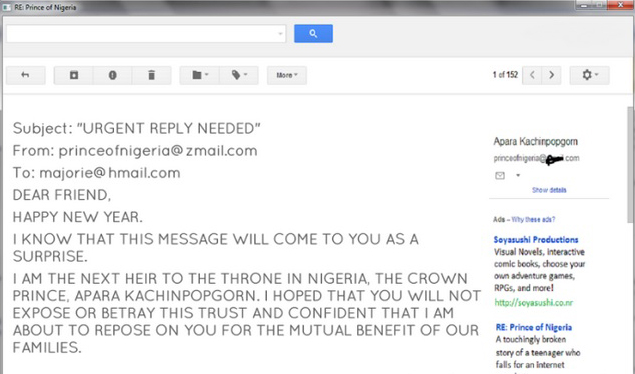
This money laundering scam – also known as the Nigerian scam – is a quite old scheme and most of us have already encountered it in a form or another in his own e-mail inbox.
Since it is an old scam, it has encountered multiple variations along the years. The typical scam starts when you receive an e-mail message where you are asked by an official government member, a businessman or the member of a wealthy family, usually a woman, to provide help in retrieving a large sum of money from a bank, paying initially small fees for papers and legal matters. For the services performed, you are promised a very large sum of money.
Of course, this is just the beginning. Eventually you are requested to pay more and more for other additional services, such as transactions, transfer costs, etc. You even receive papers that are supposed to make you believe that all this is “real“. In the end, you are left broke and without any of the promised money.
We have to mention here the cases where not only money were lost in the process, but sometimes people have been kidnapped or even worse.

Greeting Card scams

greeting
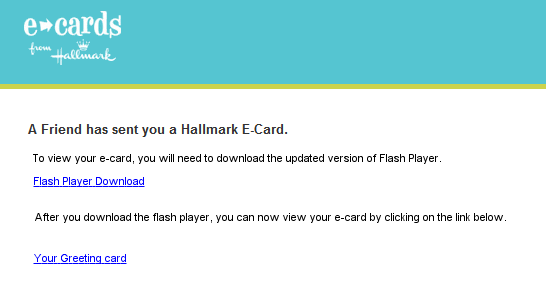
The greeting cards which arrive by e-mail in our e-mail inbox and pretend to be from a friend is again an old scam. If you open such an e-mail and click the card you are usually sent to a hacker controlled web location that downloads malicious software on your operating system.
The malicious software which downloads on your system may be an annoying program launching pop-ups and unexpected windows all over the screen, but it may also be one of the worst financial malware present around, a malicious software which could be part of the infamous Zeus family.
If your system becomes infected with such a dangerous malware, you will become one of the bots which are part of a larger network of affected computers. In this unfortunate event, your computer will start sending private data and financial information to a fraudulent server controlled by IT criminals.
To keep yourself safe from identity theft and data breach, we recommend using a specialized security program against this type of dangers.
To find out more information about financial malware, read this article.

A guaranteed bank loan or credit card scam

card_danger
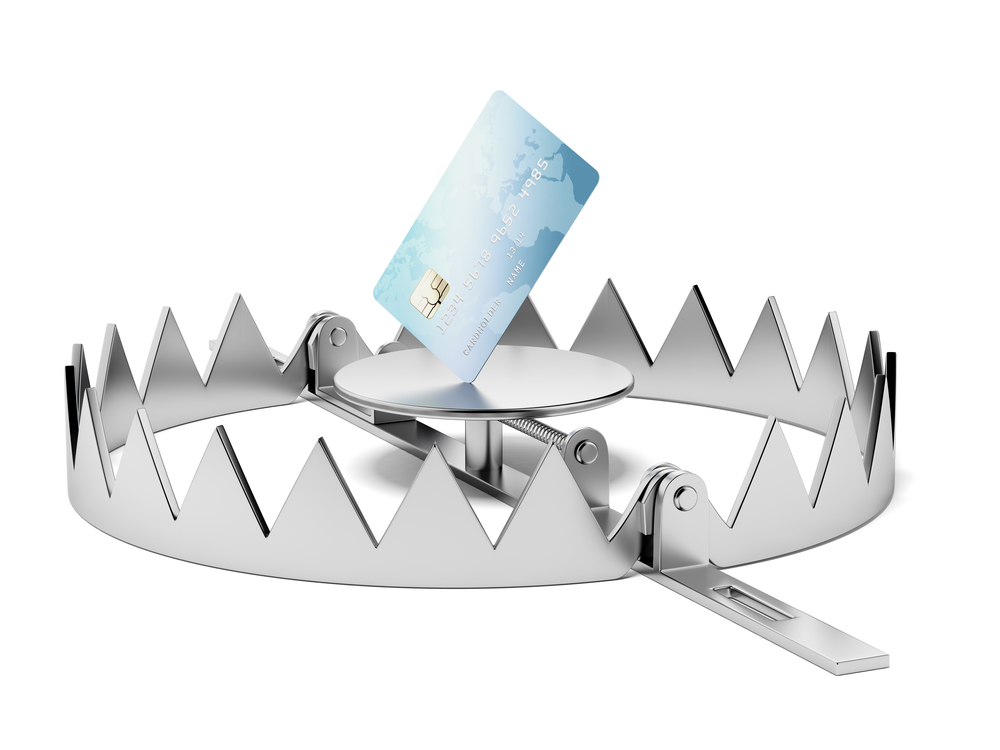
Difficult times push people into getting trapped by “too good to be true” bank offers that guarantee large amounts of money and which have already been “pre-approved” by the bank.
If such an incredible pre-approved loan is offered to you, simply use your common sense and just think about it.
How is it possible for a bank to offer such a large sum of money without knowing your financial situation?
Though it may seem unlikely for people to get trapped by this scam, there are a number of people who lost a few hundred dollars by paying the “mandatory” processing fees required by the scammers.

Lottery scam

lottery
One more classic scam which never seems to get old. The lottery scam comes as an e-mail message informing that you won a huge amount of money and all you need to do is pay some small fees before you can collect your fortune.
It doesn’t matter that you don’t recall ever purchasing lottery tickets.
Since it addresses some of our wildest fantasies, such as quitting our jobs and having fun for the rest of our lives without ever working again, our imagination easily falls pray to images of a dream house, endless summer vacations or expensive items a normal man can only imagine.
But the dream ends as soon as you find out you have been just another victim of this scam.

Hitman scam

hitman
One of the most frequent scams you can meet online is the “hitman” extortion attempt, who sends an e-mail threatening the target in order to obtain money. This type of scam may come in various forms, such as the one threatening a family member, which can be kidnapped unless a ransom is paid in a time frame provided by the scammers.
To create the appearance of a real danger, the message is associated with numerous details from the potential victim’s life, collected from an onlineaccount, a personal blog or most frequently, from a social media account.

Romance scams

romance
How many of us have already been fooled by this one? Since this one addresses our subjective self and not our rational side, we drop our guard and leave aside any logical analysis.
This scam takes place on social media sites, like Facebook, or by sending a simple e-mail to the potential target. The male scammers are often located in West Africa, while the female scammers are often based in Eastern parts of Europe.
IT criminals have used this method along the years by using online dating services and improved their approach by testing the potential victims’ reactions. This scheme or this game may take place for several months or more in order to gain the trust of that person. In many cases, it even goes to the moment when a meeting is arranged.
When this happens, two things may take place:
  • an “unpredictable” event occurs and the scammer needs money as soon as possible for his/her passport or other details.
  • if the victim comes from a rich family, he/she may be kidnapped and a large sum of money could be requested from the family.

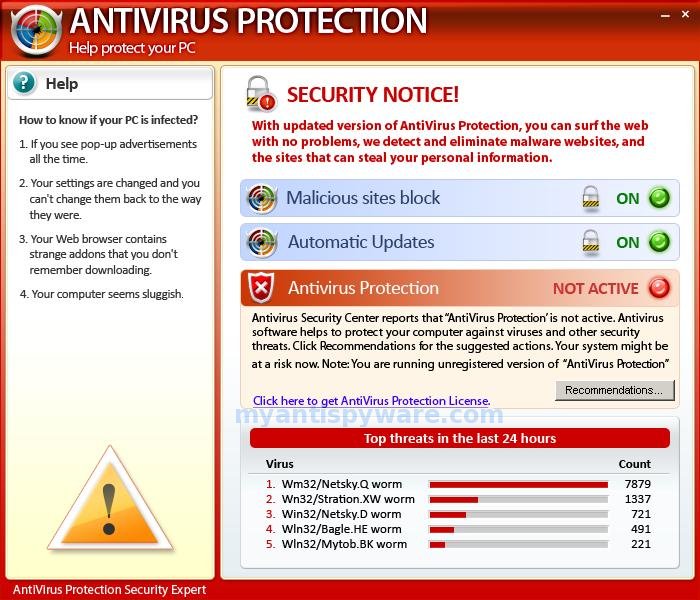
Fake antivirus software

fake-antivirus

We all saw at least once this message on our screens: “You have been infected! Download antivirus X right now to protect your computer!”
Many of these pop-ups are very well created to be similar to an actual message you get from Windows or from a normal security product. If you are lucky, there is nothing more than an innocent hoax which will bother you by sending numerous unwanted pop-ups on your screen while you navigate online.
In this case, to get rid of the annoying pop-ups, we recommend scanning your system using a good antivirus product.
If you are not so lucky and you click one of the fake pop-up windows, malicious code, such as a Trojan or a keylogger can be downloaded on your system. This kind of message could come from one of the most dangerous ransomware threats around, such as CryptoLocker, which is capable of blocking and encrypting your operating system, requesting a sum of money in order to send you a decryption key.
To avoid this situation, we recommend using a specialized security product against this type of financial malware, besides your traditional antivirus program.

Facebook impersonation scam (hijacked profile scam)

facebook-scam

Facebook is today the most popular social media network. For this reason, important companies and businesses world wide use it in sending their correct message to customers and use it to promote their products. With so many friends and connections on this online platform, we use Facebook not only to check our friends’ activities and news, but also to chat, send and receive messages.
If most friends, colleagues and social connections are on Facebook, it is quite normal for such a place to attract also unwanted attention from online scammers.
Just imagine your account being hacked by an IT criminal and having access to your close friends and family.
Since it is so important for your privacy and online security, you should be very careful in protecting your personal online accounts and set a double authentication method as soon as possible. Using this method you make sure you add an additional layer of security, in this case your phone number.

Make money fast scams (Economic scams)

money
Another common online scam is this popular method, used by cyber criminals, to make easy money by promising non-existent jobs, plans and methods of getting rich quickly and money from official government sources.
It is a quite simple and effective approach, because it simply addresses one’s basic need for money, especially when that person is in a difficult financial situation. From this point of view, this scamming method is similar to the Romance scam mentioned above, where the IT criminals address the romantic needs of the victim and then his financial means.
The fraudulent posting of non-existent jobs for a variety of positions is part of the online criminals’ arsenal.
Using various job types, such as work-at-home scams, the victim is lured into giving away personal information and financial data with the promise of getting a well paid job which can bring a lot of money in a very short period of time.

Travel scams


These scams usually appear in the hot summer months or during the short winter vacations, for Christmas or New Year’s Day. It takes place this way, you receive an e-mail containing an amazing offer for an extraordinary hard to get to destination, usually an exotic place, that expires in a short period of time and you must not miss.
The problem is that some of these offers actually hide some necessary costs until you pay for the initial offer and others simply take your money without sending you anywhere.
In these type of cases, we suggest that you study very well a travel offer and look for hidden costs, such as: airport taxes, tickets that you need to pay to access a local attraction, check if the meals are included or not, other local transport costs between your airport and the hotel or between the hotel and the main attractions mentioned in the initial offer, etc, etc.
Besides this, we suggest that you check if paying individually for plane tickets and for accommodation gives you the same results as in the offer you received. Sometimes, even if we pay more for a plane ticket to reach Asia from Europe or North America, you may be amazed at how cheap the accommodation costs can be compared to the rich Western countries..

Conclusions

Online scams have developed using increasingly sophisticated means of deceiving users, especially in the known rich countries from the Western world. According to FBI, online scams have increased over the last 10 years and the total losses doubled in the recent years, affecting both private individuals and large scale businesses. For this reason, the cyber criminal activities are now subject to federal investigations and are treated as a very serious problem which affects us all.
For an extended list of common fraud schemes discovered and analyzed by FBI, check this article.
You may think that you can’t be fooled by these online scams, since some of them are quite hilarious, such as the one threatening you to send money or the one where scammers pretend to be FBI agents.
But some stories are so convincing for the potential victims that it is difficult to know how to deal with them.
Since some scams are so well organized and convincing, and the people behind so difficult to catch, that we need to acknowledge what are the most popular and successful online scams used against us and adapt our defenses accordingly.

Get Popular on the Internet


We all wish to be popular. But unfortunately, getting popular is not so easy in the real world. However, in the cyber world of which we all are part of, it is not so tough if you follow some tips given below. Now what are you waiting for? Bring your pen and paper start taking notes on how to become famous.

1.  Start a Website: You might have heard the cliche, "everyone popular has a website." But fortunately, you don't have to be famous to have a website. You can have your website made from a specialist or can make it yourself. Just choose a topic you like, get your pen...err... keyboard ready and start creating killer content for which people would come back again and again.

2.  Start a Blog: Some bloggers are ridiculously famous. No matter what they write, people like it and start praising them. Although such wizardry would have no reason in the real world, the cyber world has a reason for everything. To become one such popular blogger, the basic thing required is killer content. The second most important thing is being regular in posting articles, and probably the most important thing required is humility. You can have your self hosted blog or choose any of the free blog hosting platforms. The two leading ones are Blogger and WordPress.

Related: What is a Blog?

3.  Join Facebook: Facebook is the second most visited website on the internet after Google. Almost everyone is on Facebook. Having so much traffic each day makes Facebook a potential advertising target. Just join Facebook, add everyone you know as a friend and also add the friends of your friends to your friends list.

Create a Facebook fan page and add a link to your website and blog on it. Observe what people like on Facebook and start a postathon of posting such articles. 'Like' other people's posts and give genuine comments on them. There is a good chance that they might get to your fan page and start following you.

Also:Why Facebook Uses Blue Color?

get popular online

4.  Join Twitter: Twitter helps you share the latest buzz on the internet. Everyone well-known is on Twitter. Be it Tom Cruise or Sachin Tendulkar, Twitter has left no one untouched. So why shouldn't you be on Twitter too? Join Twitter and start following people. It is more than likely that they will follow you in return. Be controversial but only to a limit. Moreover, tweet on any latest buzz you might see on the internet. e.g. Octopus Paul was the fairly popular on the internet in World Cup 2010. A lot more than many people tweeted about it. Most of them are popular on the internet.

5.  Join Social Networking Sites: Aside from Twitter and Facebook, join all the social networking sites you can think of. Try to be an active member of the community and take part in discussions. People will eventually start liking you and will be pulled to click on your profile. Have an amazing profile and do not forget to add a link to your website, blog, Facebook fan page and Twitter account.

6.  Join Forums: Be helpful in forums. Welcome new members and don't discourage newbies. Always encourage them and remember that there are people on the other side of your computer reading what you are typing. If you do all this, people will feel that they are under a charm and will click on your profile. Again don't forget to add a link to your website, blog, Twitter account and Facebook fan page in your profile.

7.  Your Profile:  Having a well written profile for uploading in social networking sites, your blog and website will help make you notorious much sooner. Remember to have a descriptive profile, with a slight comic touch. People will praise your profile and will be attracted to you like bears to honey.

8.  Start Commenting: Give intelligent comments on other blogs/websites with a link to your website/blog. But remember not to give spammy comments followed by a link. Use the Name/URL field to give a link. Try to correct other blogs and suggest improvements in the posted articles but remember not to become too much of a corrector. People don't like such commentators.

I am pretty sure that if you follow all of the suggestions given above, you will also become popular on the internet in no time and would also join the elite group of famous people.

15 Awesome, Useful Internet Tricks

1. For clumsy fingered folks, if you accidentally close a tab on Google Chrome, press Control+Shift+T and it’ll come back from the dead.
2. If you’re in a particular country that can’t access important content on US websites like Hulu or Netflix, Firefox and Google Chrome offer a free extension called Media Hint that can have you watching Orange is the New Black and other American exclusives in no time.
3. Control+F or Command+F will allow you to find specific terms on a page. If only life had a version of this for when we lose our keys, phone, dignity, etc.
4. Want to surf the web in private with no recording of your web habits? For Firefox users, press control+shift+p, or for Chrome it’s control+shift+N, and you’ll be browsing off the record. This isn’t just for porn watching purposes as one might think, but for several other benefits such as websites that track your cookies and use ’em to their advantage (I’m looking at you, hotel & airline companies). This simple incognito window defeats their swindling ways.
5. If you hate YouTube’s (or other website’s) ads before the start of your videos, Adblock Plus is what you need in your life. It’s basicallylike having Dikembe Mutombo protecting your eyes from any type of advertisement.
6. If you put define: in front of a word and Google it, you’ll get that word’s definition.
7. What you type into the URL bar can be surrounded by www. & .com by pressing control + enter.
8. For more specific search results, try utilizing the AROUND feature. It allows you to find separate phrases, not just mentioned in the same article or page, but inside of a specific amount of words apart. For example, if you wanted to find writings about ‘Kanye West’ and ‘pizza’ within 12 words of each other, your search would look like this:
“Kanye West” AROUND (12) “Pizza”
Having the terms you’re searching in quotation marks, the word AROUND written in ALL CAPS and the number in parenthesis are all necessary for this to work.
9. Another way to improve search accuracy is by taking advantage of the minus sign. E.g. Selena Gomez -Bieber. Boom! – you’ll get all the glorious Selena results without any of Justin’s douchey, mop bucket urinating shenanigans killing your vibe.
10. If you’re too lazy to lift a finger and click on your desired tab, control+tab (or control+shift+tab) will switch you between ‘em. As a lethargic tab hoarder, this is a great way to minimize hand movement while allowing that article from three weeks ago, that you swear you’re going to read, to remain open.
11. Corrupt A File is an enabler that can be a procrastinator’s best (or worst?) friend, allowing them to corrupt a file and make it seem like they did their work on time, but it’s unfortunately malfunctioning.

12. You can find a lot of textbooks on Google if you enter their title, then the desired file type. So an example would look like this: Book Title filetype:PDF
13. Too lazy to get up and grab your glasses? Control + or control – will allow you to adjust text sizes larger or smaller.
14. Need a disposable e-mail to avoid putting yourself at risk for spam? There’s a place called 10 Minute Mail that’s pretty self-explanatory.
15. If you’re going to do online shopping, try leaving your desired purchases in your cart for a while, and eventually you’ll get some type of discount code in an email that gives off desperate ex vibes, borderline begging you to finish the purchase. (This doesn’t ALWAYS work, but it happens enough that it’s worth trying if you don’t need whatever you’re ordering hastily.)